Microsoft's Original 2011 Secure Boot Certificates Are Expiring: Here's What You Need to Know
Over the past few months, Microsoft and PC manufacturers have started warning users about a change happening behind the scenes: the original Secure Boot certificates issued back in 2011 are beginning to expire in 2026.
Before you panic, the good news is that your computer isn't about to stop working.
For most people, this will be something that happens quietly in the background. However, it's still worth understanding what's going on and why it matters.
What's Secure Boot?
Secure Boot is a security feature built into modern computers that helps make sure only trusted software loads when your PC starts up. Think of it as a security check that happens before Windows even begins to load.
Microsoft introduced the current set of Secure Boot certificates in 2011, around the time Windows 8 arrived. Like any digital certificate, they have an expiry date, and that date is now approaching. To replace them, Microsoft has created a new set of certificates issued in 2023.
Think of Secure Boot certificates like a passport. Your passport expiring doesn't stop you being you, but it does stop airports and border officials from accepting it as valid identification. You need a new one to keep travelling without issues.
Microsoft's original Secure Boot certificates are in a similar position. They're reaching their expiry date, so Microsoft is issuing updated replacements. Your PC won't suddenly stop working, but without the new certificates it may miss out on important security protections that rely on that chain of trust.
Should You Be Worried?
In short, probably not - but it's worth paying attention to.
According to Microsoft, computers that haven't received the new certificates should continue to start normally and still receive regular Windows updates. Your apps, files and day-to-day computing won't suddenly stop working.
The catch is that older systems may miss out on future boot-level security updates. Over time, that could leave them less protected against new threats that target the startup process.
Why It Matters
Most cyber security discussions focus on viruses, phishing emails and dodgy downloads. Secure Boot protects something much earlier in the process - the moment your computer powers on.
Without up-to-date Secure Boot certificates, Microsoft can't deliver some future protections for Windows Boot Manager, Secure Boot databases and other startup components.
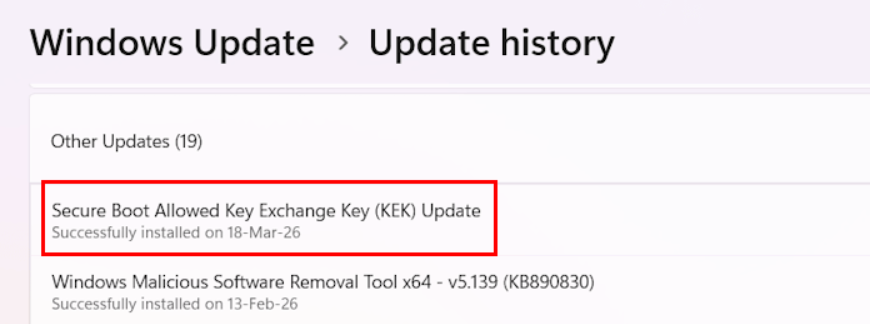
Behind the scenes, Microsoft is also replacing an important security key known as the KEK (Key Exchange Key). This key helps Windows trust future Secure Boot updates. Updating it now helps ensure your PC can continue receiving important boot-level security protections in the years ahead.
BitLocker
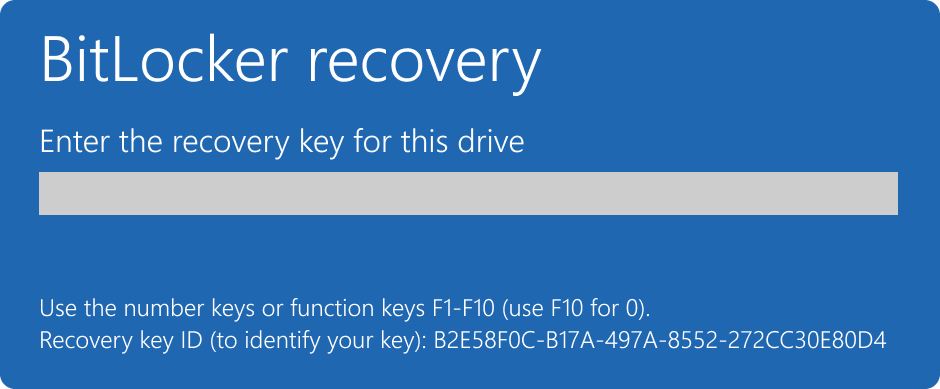
One thing to be aware of is BitLocker. Some PCs may ask for a BitLocker recovery key after firmware or Secure Boot updates. If you're using a Microsoft account or a work-managed Microsoft 365 device, that recovery key is often backed up automatically for you. If you're prompted for a BitLocker recovery key and aren't sure where to find it, Computer Clinic can help you check Microsoft accounts, Microsoft 365 tenants and other common backup locations to get you back up and running.
What Should You Do?
For most home users, there isn't much work involved.
Simply:
Keep Windows up to date.
Install BIOS or firmware updates when they're offered.
Don't ignore security notifications from Windows.
Make sure you know where your BitLocker recovery key is stored, particularly before applying firmware updates.
Avoid turning Secure Boot off unless you have a very specific reason to do so.
Most major manufacturers, including Dell, HP, Lenovo, ASUS, Acer and MSI, are already rolling out updates to support the new certificate chain.
The Bottom Line
This isn't another "your PC will stop working" scare story.
The expiration of Microsoft's 2011 Secure Boot certificates is really about keeping the foundations of Windows security up to date. Most modern computers will handle the transition automatically, while older devices may need a firmware update to stay fully protected.
If you're running an older PC and you're not sure whether it's still receiving firmware updates, now's a good time to check.
Not sure whether your PC has received the latest Secure Boot updates? Get in touch with Computer Clinic and we'll help check your firmware, Secure Boot status and BitLocker recovery options before they become a problem.